
Download miku2go – niconico, download, automatic, movies, MyLists, video, app, free, Android
Overview
miku2go is a free Android application developed by miku2goの中の人, designed to automate the downloading of videos from niconico MyLists. The software targets users who maintain curated collections of videos on niconico, a popular Japanese video-sharing platform. It enables users to automatically download content from their MyLists, which can be particularly useful for offline viewing or long-term archiving. The app supports continuous playback of videos within MyLists, streamlining the experience for users who frequently access large volumes of content.
Designed for individuals familiar with niconico’s interface and content ecosystem, miku2go assumes users have a valid account and understand the language and context of the videos they are downloading. The application does not include built-in language support or translation tools, so users must be able to interpret video titles and metadata. It is intended for personal use, with the developer emphasizing that users must ensure they have the proper rights to download and use the content.
While the app is tailored for a niche audience, its functionality may appeal to Japanese language learners, fans of Japanese pop culture, or content archivists. It operates as a productivity tool within the Android environment, aiming to reduce manual effort in managing video collections. The developer did not provide additional details about the app’s development background or team structure.
Key Features & Capabilities
- Automatic Download from MyLists – The app can automatically detect and download videos from user-curated MyLists on niconico, reducing the need for manual selection and saving time.
- Continuous Playback Mode – After downloading, the app supports seamless playback of videos in sequence, ideal for binge-watching or reviewing large collections.
- Offline Access – Downloaded videos can be viewed without an internet connection, enhancing usability in low-connectivity environments.
- Account-Based Functionality – The app requires a valid niconico account to access MyLists and associated content, ensuring integration with the platform’s user system.
- Android-Specific Design – Built exclusively for Android devices, the app leverages the platform’s background processing and storage capabilities for efficient downloads.
These features are particularly useful for users who maintain extensive video libraries on niconico and wish to manage them without repeated manual intervention. For example, a user might use the app to download an entire MyList of anime episodes for offline viewing during travel. The app’s automation capabilities help maintain consistency and reduce user workload.
User Interface, Workflow & Performance
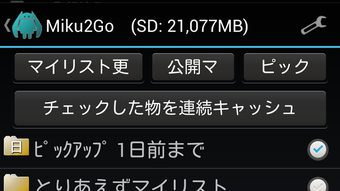
The user interface of miku2go is designed for straightforward navigation, with a focus on MyList management and download control. Users are expected to grant the app access to their niconico account and MyLists, after which the software initiates the automated download process. The workflow is linear: authenticate, select MyList, start download, and begin playback.
Navigation is likely minimal, given the app’s focused purpose. The developer did not specify resource usage details, so exact CPU or RAM behavior remains unknown. Performance observations are based on general software behavior patterns. The app may run in the background during downloads, potentially affecting battery life or system responsiveness depending on device capabilities.
Stability during long-running download sessions is not publicly documented. Users should monitor device performance, especially on older or lower-end Android devices. The app’s reliance on niconico’s API means its behavior may be impacted by changes to the platform’s infrastructure or access policies.
Compatibility & System Requirements
miku2go is designed for Android devices and is available in version 1.0.1. The installation size is 5.6 MB, indicating a lightweight footprint. The app is compatible with Android devices that support the required API level, though specific version requirements were not listed.
Compatibility information was partially provided. Users are advised to check the app’s description for device-specific compatibility details. The developer did not specify minimum hardware requirements such as RAM, processor type, or storage space beyond the file size. The app may not function on devices with outdated Android versions or limited storage capacity.
Users should ensure their device meets the platform’s baseline requirements for running third-party applications. The app’s functionality depends on a stable internet connection during download and access to the niconico service, which is primarily used in Japan.
Pros and Cons
Pros
- Free to download and use, making it accessible to a broad audience.
- Automates the process of downloading videos from niconico MyLists.
- Supports continuous playback for uninterrupted viewing.
- Designed for offline use, ideal for travel or low-connectivity areas.
- Lightweight installation size of 5.6 MB.
Cons
- Requires a valid niconico account with access to MyLists.
- Language barrier may limit usability for non-Japanese speakers.
- Compatibility with specific Android devices is not fully documented.
- Relies on external platform (niconico) for content access and functionality.
- No built-in translation or language assistance features.
FAQ Section
Is miku2go compatible with all Android devices?
Compatibility information was partially provided. Users should check the app’s description for device-specific compatibility details.
Is miku2go safe to use?
The app is free and available through official Android channels. Users should ensure they have the proper rights to download content from niconico and comply with the platform’s terms of service.
Does miku2go require an internet connection?
Yes, an active internet connection is required to authenticate with niconico, access MyLists, and download videos. Offline playback is supported after download.
Can I use miku2go without a niconico account?
No. The app requires a valid niconico account to access MyLists and associated video content.
Is miku2go updated regularly?
Version 1.0.1 was released on April 8, 2024. The update frequency has not been specified by the developer.
Final Thoughts + CTA
miku2go offers a focused and practical solution for users who manage video collections on niconico. Its ability to automate downloads and enable continuous playback makes it a valuable tool for fans of Japanese media and those who value productivity in content consumption. While its niche appeal and language requirements limit its accessibility, it delivers on its core promise with a lightweight, free design.
For users comfortable with Japanese content and familiar with niconico’s ecosystem, miku2go provides a convenient way to archive and view videos offline. The app’s simplicity and lack of cost make it a compelling option for targeted use cases.
Download miku2go now





.png)

